

Is Your Keyboard Setup Putting You at Risk?
In Singapore’s desk-based workplaces, wrist discomfort from typing is one of the most common early warning signs of poor keyboard ergonomics and work-related musculoskeletal disorders (WMSDs).
If you spend hours typing at work, your keyboard could be harming your health, without you even realizing it. Poor keyboard ergonomics can lead to wrist pain, carpal tunnel syndrome (CTS), and repetitive strain injuries (RSI). The good news? A few simple adjustments can protect your wrists, boost productivity, and prevent long-term damage.
In this guide, we’ll break down the right way to set up your keyboard, what ergonomic features to look for, and how to reduce strain so you can type pain-free.
What causes wrist pain from typing in office workers?
Wrist pain from typing usually develops due to repetitive keyboard use, poor wrist positioning, inadequate desk setup, and prolonged static posture during computer work. These factors often build up gradually over time rather than appearing suddenly.
In many office environments, keyboards are positioned too high, wrists are bent upwards during typing, or employees work for long periods without movement breaks. Over time, these habits increase strain on the tendons and nerves around the wrist and forearm.
In Singapore’s desk-based workplaces, wrist discomfort from typing is often one of the earliest warning signs of developing work-related musculoskeletal disorders (WMSDs).
Common Keyboard Ergonomics Mistakes That Lead to Wrist Strain
Many cases of wrist discomfort develop because of small workstation setup issues that go unnoticed during daily computer work.
Common keyboard ergonomics mistakes include:
• Typing with wrists bent upwards instead of neutral
• Placing keyboards too far from the body
• Working with unsupported forearms
• Sitting too high or too low relative to the desk
• Using laptops for extended periods without external keyboards
Correcting these setup issues early can significantly reduce strain before symptoms become long-term workplace injuries.
Early Signs of Wrist Strain Employees Should Not Ignore
Wrist discomfort often begins as mild symptoms that appear during or after typing tasks. These warning signs are commonly overlooked in office environments.
Early symptoms may include:
• Tingling or numbness in the fingers
• Wrist stiffness after long typing sessions
• Forearm tightness during computer work
• Reduced grip strength
• Discomfort that improves after rest but returns daily
Recognising these early signs of work-related musculoskeletal disorders helps organisations intervene sooner before conditions develop into something more serious.
How Employers Can Reduce Wrist Pain Risks in the Workplace
Organisations in Singapore can reduce wrist strain risks among employees by improving keyboard positioning, reviewing workstation setup, and managing repetitive task exposure across teams.
Simple workplace improvements include:
• Adjusting keyboard height to support neutral wrist posture
• Providing external keyboards for laptop users
• Encouraging short movement breaks during computer work
• Supporting employees with ergonomic workstation setup guidance
• Reviewing repetitive task exposure during desk-based work
Many organisations also conduct structured workplace ergonomic risk assessments to identify workstation-related strain risks early and improve typing posture across teams.
How Keyboard Ergonomics Supports Long-Term Workplace Health
Good keyboard ergonomics helps reduce strain on the wrist, forearm, shoulder, and neck during daily computer work. Small workstation adjustments can prevent symptoms from developing into longer-term musculoskeletal injuries.
When organisations improve keyboard setup across teams, they often see improvements in employee comfort, concentration, and productivity while reducing the risk of preventable workplace injuries linked to prolonged typing tasks.
Supporting safe typing posture is an important part of maintaining healthy desk-based workplaces in Singapore.
How To Set Up Proper Keyboard & Mouse Positioning?

- Keep shoulders relaxed and elbows at a 90-degree angle when typing.
- Position your keyboard flat or slightly tilted away—avoid propping it on its legs.
- Keep your wrists straight and aligned with your forearms while typing.
- Place your mouse at the same level as your keyboard to prevent overreaching.
- Adjust mouse sensitivity to reduce unnecessary wrist movements.
- Avoid resting your wrists on hard surfaces while typing—use palm supports only during breaks.
How Do You Choose The Right Keyboard For Ergonomic Comfort?
Not all keyboards are created equal! A poorly designed keyboard forces your wrists into unnatural positions, increasing strain and discomfort. Here’s what to look for:
Here are some ergonomic keyboard features to Consider:
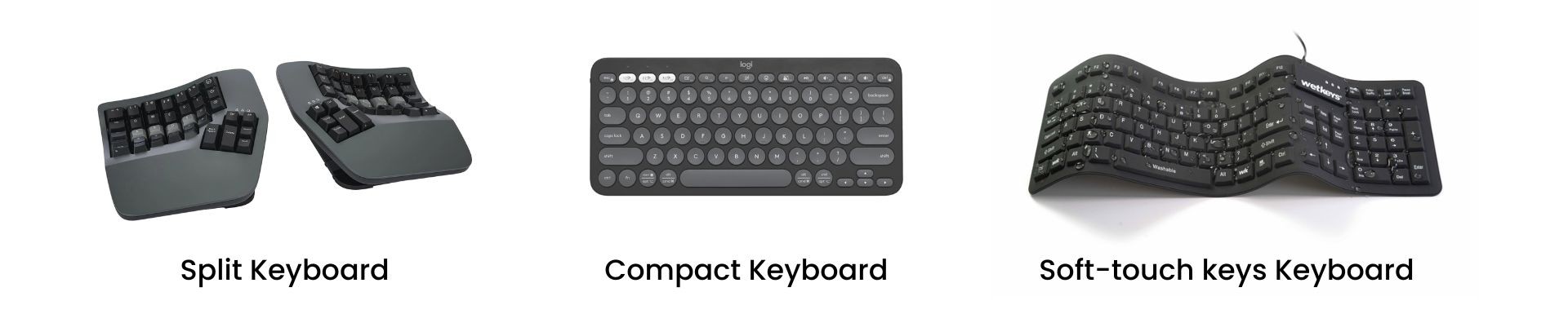
- Split or tented keyboards: Great for those with broad shoulders or wrist pain.
- Compact keyboards: Reduce overreaching and allow better mouse placement.
- Soft-touch keys: Prevent excessive force when typing, reducing muscle strain.
Best Practices for Keyboard Usage

- Maintain a neutral wrist position – wrists should be straight, not bent up or down.
- Use an adjustable desk or chair to align the keyboard at elbow height.
- Keep elbows between 90°-110° to reduce shoulder strain.
- Take short breaks every 30-60 minutes to prevent muscle fatigue.
- Incorporate wrist and hand stretches to maintain flexibility.
- Avoid resting wrists on hard surfaces while typing to prevent stress injuries.
Why is Workplace Keyboard Ergonomics Important?
Ignoring keyboard ergonomics doesn’t just cause short-term discomfort—it leads to long-term injuries and reduced efficiency. Here’s why fixing it should be a priority:
- Prevent Injuries & Strain – Poor posture increases the risk of carpal tunnel syndrome (CTS), repetitive strain injuries (RSI), and back pain. Using ergonomic keyboards and proper wrist positioning reduces strain.
- Boost Productivity & Focus – A comfortable workstation minimizes fatigue, allowing employees to stay focused longer. Adjust desk height, keyboard placement, and chair position for optimal efficiency.
- Enhance Employee Well-Being – Investing in ergonomic solutions improves job satisfaction and morale. Providing ergonomic chairs, accessories, and encouraging movement creates a healthier work environment.
Supporting Safer Workplaces with Better Keyboard Ergonomics
In Singapore’s desk-based workplaces, wrist discomfort from typing is often one of the earliest warning signs of developing work-related musculoskeletal disorders (WMSDs). While these symptoms may appear minor at first, they can gradually affect employee comfort, productivity, and long-term workplace health if left unaddressed.
For Workplace Safety and Health (WSH) professionals and employers, improving keyboard ergonomics is an important step in reducing preventable strain injuries across teams. Small adjustments to workstation setup, typing posture, and task design can significantly reduce exposure to repetitive stress risks in office environments.
By supporting better keyboard ergonomics and identifying workstation-related strain risks early, organisations can create safer, healthier, and more productive workplaces across Singapore.